Baseline Script: Sleek Hand-Drawn Font for Impact
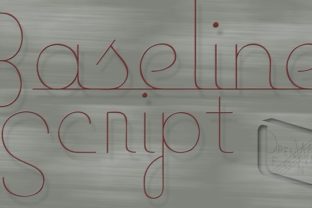
If you’ve been scrolling through font libraries looking for something that feels fresh, light, and effortlessly modern, you may have stumbled across Baseline Script. At first glance, it looks like a quick sketch—thin, continuous strokes with a hand-drawn spontaneity. But look again, and you’ll notice a deliberate precision hiding behind that casual air. Designed as a mono line font, every character maintains an even stroke width, giving the whole set a consistent, uncluttered rhythm. The ultra‑thin weight doesn’t whisper; it glides. There’s an aerodynamic quality to it, a lightness that makes it perfect for slipping into headers, accents, and short bursts of typography where you want readers to feel motion, not weight.
What really sets Baseline Script apart is its built‑in dual personality. By default, every letter comes with a subtle underline—a continuous line that connects and grounds the word. That underlined style is a natural choice for headings, titles, and callouts where you want a clean, anchored look. But you also get a complementary unlined version, equally thin but without the line running beneath. That unlined style opens up possibilities for slightly larger bodies of text, maybe a pull quote or a short paragraph where the script’s handcrafted feel adds warmth without overwhelming readability. This two‑in‑one feature means you can switch between accent and body roles without juggling multiple fonts.
What Makes Baseline Script Stand Out
Mono line fonts used to be rare, reserved for technical drawings or minimalist branding. Baseline Script brings that same single‑stroke discipline into a more expressive, handwritten realm. The line weight is remarkably consistent, which helps the font retain its clarity even at smaller sizes—though you’ll probably want to use it large enough to let the thin strokes breathe. The default underline isn’t just an afterthought; it acts as a visual baseline that keeps the words feeling connected, almost like a continuous ribbon of text. Meanwhile, the unlined version feels more open, letting the letters float on the page with a light, airy presence.
This font’s “aerodynamic” nature isn’t just a marketing tag. When you place it on a white background with generous negative space, the letters almost seem to skim across the surface. That quality makes it especially effective for modern, forward‑facing projects—think tech startups, lifestyle blogs, or creative portfolios where every design element should feel intentional and refined.
Practical Applications Across Fields
The real value of Baseline Script emerges when you match it to the right context. It’s not a workhorse for paragraphs of body text, but it shines in specific roles across personal, professional, and commercial spaces.
Personal Projects and Hobbies
If you’re designing your own wedding invitations, a birthday card, or a series of social media posts for your side hustle, Baseline Script brings a handmade authenticity without looking messy. Use the underlined style for the main headline, and pair it with the unlined variant for the names or date. The thin strokes feel delicate, so they work beautifully on light‑colored or cream papers. For digital invites, keep the background simple—white or pastel—to preserve the font’s light quality.
Professional and Business Use
Entrepreneurs, freelancers, and marketing professionals often need to create branded materials that stand out without shouting. Baseline Script can serve as an accent font for slide decks, one‑pagers, or email headers. Imagine a quarterly report with a clean sans‑serif for the data and a Baseline Script heading that reads “Our Journey This Quarter.” The underlined style anchors the heading, while the thinness keeps it from competing with the numbers. In client presentations, a hand‑drawn header can signal a human touch—perfect for agencies pitching creative campaigns.
For educators and trainers, this font works well for workshop titles, online course headers, or visual aids where you want to emphasize key concepts. Its light weight, combined with the underline, creates a guided reading experience. Pair it with a bold, readable body font like a sturdy sans‑serif to maintain accessibility.
Digital and Web Environments
On screens, thin fonts can be tricky. Baseline Script holds up well when used at larger sizes (24px or above) and on high‑resolution displays. It’s a natural fit for hero sections, banner headlines, and navigation accents. Because the underlined style already provides a visual baseline, you can avoid adding extra underlines or decorative lines. The unlined version works for short taglines or descriptions, but avoid making it your main paragraph font—the thin strokes may become hard to read over time, especially on mobile.
Bloggers and publishers can use Baseline Script for post titles, section breaks, or pull quotes. Its hand‑drawn quality adds personality to an otherwise standard layout. For example, a travel blogger might use it to label destinations or highlight a memorable quote from a trip. The font’s aerodynamic feel subtly reinforces the idea of movement and exploration.
Commercial and Branding
When you need a brand to feel modern, streamlined, and approachable, Baseline Script can become a signature element. Use the underlined variant for logos, product names, or taglines in packaging. A small coffee roaster might include a Baseline Script “Single Origin” on its bags, paired with a clean sans‑serif for the ingredients. The thin strokes suggest precision and care, while the hand‑drawn vibe prevents the brand from feeling corporate.
For signage or outdoor materials, be cautious: the ultra‑thin weight can disappear against busy backgrounds or at long distances. Reserve it for interior signage, digital displays, or print materials where you control lighting and contrast.
Benefits You Can Actually Work With
The dual‑style nature of Baseline Script saves you time and decision fatigue. Instead of hunting for a matching outline or underline font, you get both variants in one package. This efficiency is valuable for designers, marketers, and creators who need to move fast without sacrificing consistency. The font also simplifies alignment: the underline in the default style acts as a natural guide for layouts, so you don’t need extra rules or dividers.
From a branding perspective, Baseline Script helps you communicate two qualities at once: authenticity (through the hand‑drawn look) and precision (through the mono line construction). That combination is hard to find in other script fonts, which often lean too casual or too rigid. When you use it consistently across a website, social media, and print, it builds a cohesive visual identity that feels both human and polished.
Engagement often comes down to how a piece of text makes a reader feel. A Baseline Script heading can stop a scroll, invite a closer look, and convey a sense of lightness and motion. For content creators, that split second of attention is gold. Whether you’re publishing a newsletter, a blog post, or a product page, a well‑placed script accent can boost readability and recall.
Practical Considerations Before You Use It
Before you download and install Baseline Script, think about where and how you’ll deploy it. Because the strokes are so thin, legibility drops quickly below 14–16px in print and 18–20px on screen. Always test the font at your intended sizes on actual devices or paper. For body text, stick to the unlined variant at larger sizes (maybe 20px or more), and never use the underlined version for blocks of text—the line can create visual noise when multiple lines stack.
Pairing matters. Baseline Script sings when set against a background that offers strong contrast but isn’t too busy. White, off‑white, light gray, or muted pastels work best. Dark backgrounds can work if you bump up the font size and avoid surrounding it with heavy imagery. Combine it with a simple sans‑serif for body text—something like Open Sans, Lato, or Work Sans—so the script remains the star. If you need a display font for headers, a medium‑weight sans‑serif will complement Baseline Script without overshadowing it.
Also, check the font’s licensing. Many versions of Baseline Script are available for personal and commercial use, but terms vary. If you’re using it for a client project or your own business, make sure you have the right license to avoid issues down the road.
Finally, don’t overuse it. Because Baseline Script is so distinctive, using it too often in a single design can dilute its impact. Reserve it for key moments—the main headline, the brand name, the call to action—and let the rest of your layout breathe with simpler type.
Getting the Most Out of Baseline Script
Think of Baseline Script as a tool for emphasis, not volume. The light, aerodynamic strokes are perfect for slipstreaming—guiding the eye smoothly from one element to the next. In a clutter‑filled media landscape, a touch of hand‑drawn simplicity can cut through the noise. Whether you’re a marketer refining a landing page, a creator building a personal brand, or an educator designing engaging materials, take the time to test the font in your specific environment. Adjust spacing, size, and color until it feels natural.
When used thoughtfully, Baseline Script adds a layer of sophistication and warmth that generic system fonts simply can’t match. It invites the reader to pause, to appreciate the texture of the letters, and to experience the message as something crafted, not just typed. That emotional connection is exactly what separates forgettable content from content that sticks.