Show Me the Bunny: A Fresh Take on Easter Design
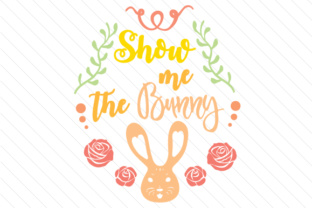
If you create Easter projects regularly, you know how easy it is to fall into a pattern of pastel bunnies, generic eggs, and predictable typography. The design landscape this season feels different, and one file set called Show Me the Bunny is prompting many creators to rethink what an Easter graphic can do. At first glance, it looks like a cheerful bunny face framed by flowers and wreaths, but the thinking behind it goes deeper. The design uses a single font type while relying on color variation and Easter motifs to carry the visual weight. That restraint is intentional. It keeps the artwork cohesive, scalable across different formats, and easy to customize without needing to strip and rebuild a complex layout.
For anyone juggling multiple Easter projects, this approach makes a real difference. Instead of spending time reconciling mismatched fonts or reworking a busy composition, you open one file and start building. Whether you run a small print shop, teach a classroom craft session, or simply want personalized gift wrap for family, the design gives you a strong starting point. Let's explore what Show Me the Bunny actually includes, how it performs in real workflows, and who stands to gain the most from adding it to their resources this season.
What Makes This Design Distinct
The core of Show Me the Bunny is a whimsical bunny face paired with floral wreaths and accents that immediately signal Easter without resorting to clutter. The decision to use one font type across the entire design is a deliberate move toward consistency. When you work with multiple typefaces, aligning weights, spacing, and tone takes extra effort. Here, that work is done for you. The font is clean and readable, and the color palette leans into the cheerful pastels and earthy tones that feel seasonal but not dated.
The bunny face itself is expressive without being overly detailed. That matters when you scale the design up for a large sticker or down for a tattoo. Details that are too fine can blur or break apart during printing or cutting. The flowers and wreaths frame the bunny in a way that draws the eye naturally, and the overall composition leaves enough negative space that you can add your own text, logos, or branding without feeling cramped.
Another aspect worth noting is the file format bundle. You receive SVG, transparent PNG, EPS, and DXF. This range covers nearly every common workflow, from drag-and-drop design apps to professional vector editors and cutting machine software. The transparent PNG is especially useful for quick mockups, social media posts, or layering into other designs without background removal. The SVG and EPS files preserve the crisp lines and allow unlimited resizing without quality loss. The DXF format means Cricut, Silhouette, and similar users can import directly into their cutting software and get to work immediately.
Practical Applications Across Real Projects
The strongest test for any design resource is whether it saves time in production while still letting your personal creative choices shine. Show Me the Bunny performs well in that balance. Consider Easter stickers, which are popular for planners, notebooks, water bottles, and treat bags. The bunny face and wreath motifs are self-contained enough that they work as individual stickers or as part of a larger set. You could print a sheet of die-cut stickers with the bunny repeated in different color variations, and the single-font consistency ensures the whole sheet looks intentional, not chaotic.
Temporary tattoos are another growing category for Easter, especially for family events, Easter egg hunts, and spring festivals. The design's clean lines and bold shapes transfer cleanly to skin without losing detail. The flowers and wreaths have enough visual interest that both kids and adults find them appealing. You can apply them as standalone pieces or combine them into a small collage. Because the originals come in a transparent PNG format, you can quickly test placement on a skin tone mockup before committing to production.
Custom gift wrap is perhaps where this design really demonstrates its versatility. You can scale the bunny face up as a repeating pattern across wrapping paper, or use it as a focal point on a gift tag. The wreath elements work well as corner decorations or border accents. If you are wrapping homemade treats, candles, or small Easter gifts, the design adds a personal touch that feels crafted rather than store-bought. The EPS format makes it simple to adjust colors to match a specific brand or gift theme, so you are not locked into the default palette if something else fits your needs better.
Party decorations such as banner pieces, cupcake toppers, and favor bag labels all benefit from the same cohesive look. Because the file set includes DXF, you can cut the designs from cardstock, adhesive vinyl, or even heat transfer material for fabric projects like T-shirts and tote bags. The single font means you can easily add phrases like "Happy Easter," "Bunny Kisses," or the title phrase itself, knowing the text will blend seamlessly with the existing artwork.
Who Benefits Most and Why
Small business owners who sell Easter-themed products on platforms like Etsy, Amazon Handmade, or local craft fairs stand to gain significant time savings. When you produce multiple variations of a product, the last thing you want is to rebuild a design from scratch for each one. With Show Me the Bunny, you can open the vector file, change the background color, export a few variants, and list new items in the same session. The consistency across formats also helps maintain a recognizable brand look, which builds trust with repeat buyers.
Bloggers and content creators preparing Easter roundups, printable resources, or social media campaigns will find the transparent PNG format especially useful. You can drop the bunny into a blog post header, an Instagram story, or a Pinterest pin without spending extra time on masking or background cleanup. The file size is manageable, and the resolution holds up on both screen and print. If you create downloadable content for your audience, providing a cut file or a sticker sheet using this design adds real value to your readers.
Educators planning Easter classroom activities often need materials that are quick to prepare, visually engaging, and appropriate for a range of ages. The bunny face is friendly without being babyish, so it works for preschool craft projects and elementary-level writing prompts alike. You could print the design on adhesive paper for instant stickers, use it as a coloring template, or incorporate it into a spring bulletin board. The vector formats let you enlarge the design for a poster or shrink it for desk labels without losing clarity.
Hobbyists who enjoy scrapbooking, card making, or vinyl crafting will appreciate the built-in balance of the composition. When you work with paper and physical materials, you cannot undo layers easily. Having a design that already looks good on its own means you spend more time assembling and less time tweaking trial prints. The wreath elements work especially well as corner embellishments on handmade cards, and the bunny face serves as a natural focal point for a front cover.
A Note on Fit and Flexibility
No single design works for every project, and it helps to be clear about the situations where Show Me the Bunny fits best and where you might want to compare options. The aesthetic leans toward cute and cheerful. If your Easter project requires a minimalist or modern look, the floral accents and round shapes may feel more decorative than you want. Similarly, if you need a design specifically for strictly religious Easter materials, the bunny motif may not align with that tone. In those cases, you could use only the wreath and flower elements from the file and omit the bunny, but the design is clearly built with a lighthearted, playful audience in mind.
Color flexibility is strong if you work in the vector formats, but the raster preview PNG comes in the default palette. If you need a specific color match for a brand or themed event, plan to open the SVG or EPS file and adjust. The process is straightforward in tools like Adobe Illustrator, Inkscape, Affinity Designer, or even web-based editors like Canva's vector support. The single font limitation is actually a strength in most workflows, but if your project demands multiple typefaces for contrast, you may want to add a secondary font on your own, keeping the bunny and wreaths as the primary graphic layer.
Making the Most of Your Files
Once you download the set, the smartest first step is to open the SVG or EPS in your preferred editor and duplicate the design across a few artboards. Experiment with color variations: a mint green background with a white bunny, a lavender wreath with yellow accents, a peach-toned version with deeper coral flowers. These quick iterative tests usually reveal two or three strong colorways that you can then export in bulk. The DXF file is ready for cutting, but it is always worth running a test cut on scrap material first to confirm that the bunny face and flower details cut cleanly at your intended size.
For print projects, the transparent PNG saves you a step. Drop it directly into a print layout, add your custom text or border, and send it to the printer. If you are printing at home, check that your paper type and printer settings match the design's resolution. For professional print runs, providing the EPS file to your printer ensures the sharpest output. Sticker sheets, tattoo paper, and fabric transfer sheets all respond differently, so a small test print is never wasted effort.
The design also lends itself to digital use. If you build Easter email headers, Zoom backgrounds, or social media templates, the transparent background makes layering effortless. You can place the bunny over a photo of spring flowers or a textured background, and the wreath frames it naturally. The single font ensures any text you add in the same style complements rather than competes.
In the end, Show Me the Bunny delivers a concentrated bundle of usefulness for anyone who creates Easter projects with regularity or even just for a special event. The thoughtful limitation of one font type, the variety of motifs, and the wide format support all point to a design that was assembled with production realities in mind. Whether you are printing stickers for a shop, cutting vinyl for a family celebration, or designing content for a community of readers, this file set gives you a foundation that saves time and leaves room for your own creative decisions.