Eyes: A Playful Dingbat Font for Creative Design Projects
Finding the right typographic element for a children's book, a Halloween flyer, or a whimsical branding project can sometimes feel like searching for a needle in a haystack. You need something that captures attention, conveys the right mood, and stands out from the sea of standard serif and sans-serif options. This is where specialty dingbat fonts come into play, and among them, Eyes, a unique font created by Gustavo Lucero, offers a surprisingly versatile solution. This article explores what Eyes is, why you might need it, and how to use it effectively in your next project.
What Exactly Is the Eyes Dingbat Font?
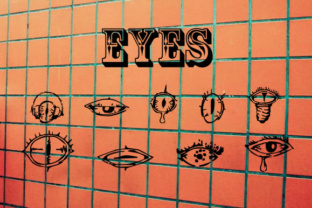
At its core, Eyes is a dingbat font. Unlike traditional alphabetic fonts that represent letters and numbers, a dingbat font uses symbols, shapes, and illustrations in place of characters. In the case of Eyes, Gustavo Lucero has designed a complete set of 26 hand-drawn eyes. Each letter of the alphabet, from A to Z, corresponds to a distinct eye illustration. Some are wide and curious, others are sleepy or mischievous, and several carry a playful, slightly spooky vibe that works wonderfully for Halloween or monster-themed content.
The hand-drawn quality of each eye gives the font an organic, non-digital feel. This is a deliberate artistic choice that makes the font feel warm, approachable, and full of personality. For designers, educators, and content creators, this means you're not just placing a generic icon; you're adding a piece of handcrafted art to your layout.
Why Choose a Dingbat Font for Your Project?
You might be wondering when a font like Eyes is the right tool for the job. Many adults working on creative projects face a common challenge: how to make a design feel unique without spending hours creating custom illustrations from scratch. You want something that is instantly recognizable, emotionally resonant, and easy to implement. Standard clip art can feel dated, and stock photography may not convey the playful or spooky tone you're after.
Dingbat fonts solve this problem by offering a library of ready-made graphics that you can type out as easily as you type a sentence. With Eyes, you gain access to 26 different eye illustrations that can be scaled, colored, and arranged just like text. This flexibility is a huge advantage when you need to iterate quickly or maintain design consistency across multiple assets.
Another common goal is audience engagement. If you're designing for children or creating event marketing for a Halloween party, you need visuals that spark curiosity. Eyes naturally draw people in. A page filled with staring, blinking, or winking eyes immediately creates a sense of fun, mystery, or gentle spookiness. The font itself becomes a conversation starter.
Practical Applications for the Eyes Font
Let's look at how different users might approach this font and the outcomes they can achieve. The beauty of Eyes lies in its adaptability across various media.
Children's Book Illustrations and Educational Materials
If you are a teacher, a parent creating a homemade storybook, or a children's book author, you know that visuals are critical for holding a child's attention. The Eyes font can be used to create borders, decorate chapter headings, or even replace letters in key words. For example, you could spell out "LOOK" using the eye font, turning the word into a literal representation of its meaning. This is a fantastic way to reinforce vocabulary for early readers.
Consider a worksheet about emotions. You could type out different eye characters to represent happy, sad, surprised, or sleepy expressions. Children can then match the eye to the correct emotion. This hands-on, visual activity is more engaging than a simple word list. The hand-drawn style of the font also avoids the sterile look of many educational materials, making the learning experience feel more personal and creative.
Halloween and Monster-Themed Party Decor
Halloween is one of the most popular seasons for using specialty fonts. Whether you are designing party invitations, banners, treat bag labels, or spooky signage, Eyes provides an immediate visual shortcut to a creepy-cute aesthetic. Instead of using a standard font and adding eye clip art separately, you can type an entire message using the eye characters. This creates a unified, patterned look that is both cohesive and striking.
Imagine a poster that reads "WATCH OUT" with every letter replaced by a different eye character. The result is a wall of staring eyes that instantly communicates a sense of being watched. It is playful rather than terrifying, making it perfect for family-friendly events, school carnivals, or neighborhood parties. The 26 different eye designs ensure that you never have to repeat the same shape too often, keeping the visual texture interesting.
Social Media Graphics and Digital Content
In the digital space, standing out on social media requires a mix of strong visuals and consistent branding. Content creators, bloggers, and small business owners can use Eyes to create custom emojis, highlight reels, or quote cards. Because the font is a dingbat, you can use it in any design software that supports custom fonts, including Canva, Photoshop, or Illustrator.
For a spooky season giveaway, you could create a graphic with the text "ENTER IF YOU DARE" and use the eye font for the word "EYES" or incorporate eye symbols around the border. This adds a layer of thematic detail without requiring you to source and import external images. The scalability of vector fonts means you can make the eyes as large or as small as you need without losing quality.
Packaging and Product Labels
If you are a small-batch maker or artisan selling products like candles, soaps, or snacks with a Halloween or monster theme, packaging is everything. The Eyes font can be used on labels, hang tags, or shipping inserts. A candle labeled "Monster Mash" with a row of hand-drawn eyes around the rim immediately tells the customer what vibe to expect. It is a cost-effective way to add handcrafted detailing to your product line.
How to Get the Most Out of the Eyes Font
To use Eyes effectively, you need to think beyond simply typing a sentence. Here are several practical recommendations to help you achieve professional results.
- Combine with a clean body font: Because the eyes are detailed and busy, pair them with a simple, legible sans-serif font like Helvetica, Arial, or Montserrat for your main text. This creates a nice contrast and prevents your design from becoming visually overwhelming.
- Use color intentionally: The hand-drawn lines of the eyes can be recolored easily. For a Halloween project, try orange, purple, or neon green. For a children's book, use bright primary colors or soft pastels. Black and white works perfectly for a classic, sketchy look.
- Adjust size and spacing: Experiment with large, widely spaced eyes for a bold statement, or small, tightly packed eyes for a textured pattern. Leading and letter spacing (tracking) are your friends here.
- Create repeating patterns: Type a sequence of eye characters and use the font as a pattern fill for a background. This is excellent for wrapping paper, scrapbook pages, or digital backgrounds.
- Highlight single characters: Use just one eye character as a bullet point, a logo mark, or an accent next to a heading. A single, large eye can be a very powerful visual anchor.
Different Approaches for Different Users
Not everyone will use Eyes the same way, and that is part of its strength. A professional graphic designer might use the font to create a cohesive brand identity for a children's museum exhibit about the senses. They could use the eyes in marketing materials, wayfinding signs, and interactive digital displays. The font becomes a unifying visual language.
A hobbyist scrapbooker, on the other hand, might use the font to add quirky details to a memory book about a family trip to a pumpkin patch. For them, the ease of use is paramount. They can install the font on their computer and immediately start adding eye illustrations to their layouts without learning complex software.
A teacher preparing classroom materials can use Eyes to create engaging bulletin board headers. Instead of cutting out individual eye shapes by hand, they can type the word "WELCOME" using the font, print it out, and have an instant, cohesive decoration. This saves time and effort while delivering a visually appealing result.
Even a small business owner running an online store can benefit. During the Halloween season, they can quickly update their website banner, email newsletter, and social media profiles with graphics featuring the Eyes font. This creates a timely, seasonal refresh without the cost of hiring a designer.
Important Considerations When Using Dingbat Fonts
While Eyes is a fantastic tool, there are a few things to keep in mind to ensure your project is successful. First, remember that not all software handles dingbat fonts the same way. Some programs may not preview the characters correctly, so it helps to have a character map open to see which key corresponds to which eye. Gustavo Lucero's documentation for the font will typically provide a helpful reference.
Second, think about legibility and context. If you replace entire words with eye characters, your audience may not be able to "read" the text. This is fine for decorative purposes, but if you need to convey a specific message, use the font sparingly as an accent rather than the primary text vehicle. Your audience's needs should always guide your design decisions.
Lastly, consider file format and licensing. Make sure you download the font from a reputable source and check the license terms. Some free fonts are for personal use only, while others require a purchase for commercial projects. Understanding this upfront will save you headaches later.
Final Thoughts on Using Eyes in Your Work
The Eyes dingbat font by Gustavo Lucero is more than just a novelty. It is a practical, flexible resource that addresses real creative challenges. Whether you need to engage a young reader, create a memorable Halloween invitation, or add a handcrafted touch to your branding, these 26 hand-drawn eyes offer a simple yet powerful solution. By understanding your audience's needs and applying the font thoughtfully, you can elevate your projects while saving time and effort. Experiment with pairing, scaling, and coloring, and you will quickly discover why a well-chosen dingbat font can be one of the most versatile tools in your design toolkit.