Complex v15: Why This Bold Serif Deserves Your Attention
Typography can make or break a project. You have likely scrolled past hundreds of fonts this week alone, but few leave a mark like a well-crafted serif. Complex, especially in its v15 iteration, is one of those typefaces that demands a second look. It is bold, structured, and carries a personality that bridges classic print traditions with modern digital needs. If you are a designer, entrepreneur, blogger, or small business owner, understanding what Complex v15 offers—and where it can trip you up—will save you time, money, and revision headaches.
This article walks through what makes Complex v15 distinctive, common mistakes people make when adopting it, and how to use it effectively without falling into traps that undermine your work.
What Complex v15 Actually Is
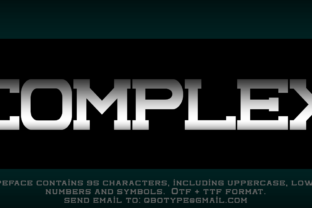
Complex is a bold serif typeface that draws inspiration from nineteenth-century display faces while incorporating contemporary proportions and spacing. The v15 release refines earlier versions with improved kerning, expanded character sets, and better performance across screen and print environments. Its high contrast between thick and thin strokes gives it a dramatic presence, making it suitable for headlines, posters, branding, and editorial design where you need authority without shouting.
People are drawn to Complex because it feels substantial. It carries weight without being heavy-handed. The serifs are deliberate, the terminals are sharp, and the overall rhythm is confident. For anyone working on projects that require a blend of tradition and modernity—think boutique branding, magazine layouts, or even premium blog headers—Complex v15 offers a palette that few fonts in its category match.
But that confidence comes with responsibilities. A bold serif like Complex can dominate a layout in ways you might not anticipate, and small missteps in usage can turn an elegant piece into a messy one.
Mistake #1: Treating Complex Like Any Other Serif
One of the most common errors is assuming Complex behaves the same as a neutral serif like Georgia or Times New Roman. It does not. Complex v15 is a display typeface at its core, even though some weights can be used for short body text in controlled settings. People often force it into paragraphs of dense copy, expecting it to read smoothly at small sizes. The result is cramped, fatiguing text that loses the very character that made you choose it in the first place.
How to avoid this: Reserve Complex for headlines, subheadings, pull quotes, and short blocks of accent text. If you need body copy alongside it, pair it with a clean, neutral sans-serif or a lighter serif designed for extended reading. For example, use Complex v15 for your main title and key section headers, then let a font like Inter or Source Serif handle the paragraphs. This respects the typeface's strengths and keeps your layout readable.
Realistic example: A small business owner designing a one-page brand brochure might set the company name and tagline in Complex v15, then use a lightweight sans-serif for service descriptions. The contrast works in your favor, and the page breathes.
Mistake #2: Ignoring Tracking and Leading Adjustments
Complex v15 has a robust presence, and its default letter spacing is calibrated for display sizes. When you drop it into a layout without adjusting tracking (letter spacing) and leading (line spacing), you often end up with text that feels either too tight or too loose. Beginners especially leave the default settings unchanged, which works fine for some fonts but not for one with this much personality.
Tight tracking at larger sizes makes the letters collide visually, especially with the pronounced serifs. Loose tracking at smaller sizes makes the text feel disconnected. Both scenarios hurt readability and professional polish.
How to avoid this: For headlines set at 36 points or larger, add a small amount of positive tracking—between 20 and 40 units depending on your software. For subheadings around 18 to 24 points, keep tracking neutral or slightly positive. Leading should be at least 1.2 times the point size for display text, and closer to 1.4 times if you use Complex for short body copy. Test your settings on both screen and paper before finalizing.
Realistic example: A blogger using Complex v15 for post titles at 48 pixels might apply +30 tracking to let the serifs breathe. Without that adjustment, the word "Complex" itself can feel cramped at that size, with the 'm' and 'p' competing for space.
Mistake #3: Overlooking the Context of Use
Complex v15 is not a font for every project. Its bold, serif-heavy design evokes a specific mood: authoritative, traditional, premium, and sometimes even academic or industrial. Using it for a playful children's brand, a casual social media campaign, or a lightweight lifestyle blog can create a mismatch between the visual tone and the message. This disconnect confuses audiences and dilutes brand identity.
People sometimes choose Complex because it looks impressive on its own, without considering whether it aligns with the project's purpose. The font becomes a distraction rather than an asset.
How to avoid this: Before committing to Complex, ask yourself: Does this project need to feel established, serious, or luxurious? If the answer is no, consider a different typeface. For projects that sit in a neutral or playful space, a softer serif or a geometric sans-serif will serve you better. When Complex is the right fit, commit fully—use it consistently across headers and key visual elements to reinforce the tone.
Realistic example: A freelancer designing a logo for a law firm might choose Complex v15 for the firm's name and get excellent results. The same freelancer using Complex for a weekend market vendor's flyer would likely create a visual clash, because the font's gravity outweighs the event's casual nature.
Mistake #4: Downloading Incomplete or Unlicensed Versions
Complex v15 is a commercial typeface, and like many quality fonts, it comes in multiple weights and styles. A frequent mistake is downloading a partial version from a free font site that only includes the regular weight and lacks proper kerning tables, extended characters, or hinting for screen display. This leads to broken layouts, missing glyphs, and poor rendering, especially on mobile devices.
People often assume one weight is enough, or they grab a copy without checking the license terms. Using Complex v15 without a proper license for commercial work can also create legal and ethical issues down the line.
How to avoid this: Purchase Complex v15 from a reputable foundry or distributor that provides the full family—including italic, bold, and any alternate characters. Verify the license covers your use case, whether that's web embedding, print, or app design. If budget is a concern, many foundries offer a single-weight license at a lower cost, which still gives you a properly kerned, well-hinted font. Always test the font in your design software before purchasing a full family.
Realistic example: A marketer downloading Complex from a free aggregator might find that the letter 'g' is missing in the italic version, or that the font looks jagged on a retina screen. Paying for the authentic v15 release ensures you get the complete character set and proper technical support.
Mistake #5: Using Complex at Too Small a Size
Because Complex v15 is a bold serif with high stroke contrast, it does not scale down gracefully. At sizes below 14 points, the thin strokes can become nearly invisible, and the serifs may blur together. This is especially problematic on screens where subpixel rendering can make delicate details disappear. People often use Complex for body text in an attempt to unify the design, only to find that readers struggle to parse the content.
How to avoid this: Set a minimum size of 16 points for any use of Complex v15 on screen, and 14 points for print. Even then, limit its use to short passages—no more than a few lines. For anything longer, switch to a companion font. If you must use Complex for a caption or small label, increase the tracking slightly and test on multiple devices or print proofs.
Realistic example: An educator designing a course handout might set the title in Complex v15 at 30 points and a short quote at 18 points. The body text, however, would be set in a cleaner serif at 11 or 12 points. This preserves the visual hierarchy without compromising readability.
Mistake #6: Neglecting Pairing and Hierarchy
A bold serif like Complex v15 naturally dominates a page. If you pair it with another strong typeface without clear hierarchy, the design feels chaotic. Beginners often combine Complex with other decorative or bold fonts, hoping to create variety, but the result is visual competition rather than harmony. The eye does not know where to look first.
Similarly, using Complex for every headline level without varying weight or size flattens the hierarchy. You lose the sense of progression from main title to subhead to section break.
How to avoid this: Pair Complex v15 with a neutral, low-contrast sans-serif such as Work Sans, Lato, or Roboto for body text and secondary elements. Keep the palette to two typefaces maximum, and use size, weight, and color to establish hierarchy. For example, use Complex v15 bold for the main heading, Complex v15 regular for subheadings, and a sans-serif for body copy. If you need a third level, try using an italic version of your sans-serif rather than adding another font.
Realistic example: A small business owner creating a one-sheet brand guide might use Complex v15 bold for the brand name, Complex v15 regular for the tagline, and a clean sans-serif for mission text and contact details. The hierarchy is clear without extra clutter.
What to Check Before You Commit to Complex v15
Before you download, purchase, or build a project around Complex v15, take a few minutes to evaluate a few practical factors:
- File format and compatibility: Make sure you are getting OTF or TTF formats that work in your design software. If you plan to use it on the web, check for WOFF2 availability and proper CSS font-weight mapping.
- Character coverage: Does the version you are considering include accented characters, ligatures, or alternate glyphs you might need? For multilingual projects, verify that Complex v15 supports your required languages.
- Rendering tests: Test the font on a few different devices and browsers if possible. Some bold serifs can look dramatically different on Windows versus macOS, especially at smaller sizes.
- License terms: Confirm whether the license covers web use, print, embedding, or all of the above. If you are a freelancer or agency, check if the license allows client transfer.
- Performance impact: For web use, a heavy font file can slow down page load times. Complex v15 has multiple weights, so consider subsetting or using only the weights you actually need.
Making Complex Work for Your Projects
Complex v15 is a powerful tool when used with intention. It brings authority, warmth, and a crafted feel that many modern fonts lack. But that power requires respect for its proportions, its context, and its limits. The difference between a design that looks amateurish and one that looks professional often comes down to the details: tracking, size, pairing, and license.
Start with a clear purpose. Use Complex where it can shine—headlines, branding, short statements—and step back where it cannot. Pair it with restraint, test it thoroughly, and buy it properly. When you do, the font will reward you with a presence that makes your work stand out for the right reasons.
If you are still unsure whether Complex v15 fits your next project, spend an hour testing it in real layouts. Put it alongside your content, adjust the spacing, and see how it feels at different sizes. That hands-on evaluation will tell you more than any spec sheet ever could.