Basica: A Strong Sans Serif Font Built for Real-World Use
If you spend any time working with type, you know the feeling of hunting for a font that actually does what you need. You want something clean, reliable, and versatile—not a display face that only works at giant sizes or a thin, delicate font that falls apart in body text. Basica is a strong sans serif font that fits that middle ground. With 260 glyphs covering uppercase, lowercase, numbers, and symbols, it gives you enough range to handle real projects without overwhelming you with useless extras. But more importantly, it works well in the situations where people actually need a dependable typeface.
What Basica Offers Right Out of the Box
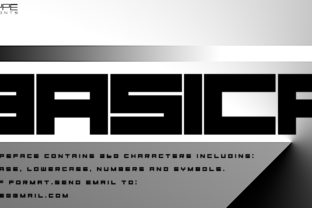
Basica is designed to be straightforward. Its letterforms are sturdy, with consistent stroke weight and a clean, modern silhouette. The uppercase characters feel confident without being aggressive, and the lowercase keeps readability high even at smaller sizes. Numbers and symbols are neatly integrated, so you won't run into alignment issues when you add prices, dates, or punctuation into your layouts.
The glyph set—260 characters—covers standard punctuation, accented letters, and common symbols. That means you can use it for English text without constantly switching to a fallback font. For most everyday projects, that is more than enough. You are not paying for hundreds of obscure characters you will never touch. Instead, you get a focused, practical set that handles the bulk of real-world typography.
Where Creators and Designers Reach for Basica
If you design anything with text, you have likely tested a dozen sans serif fonts already. Basica stands out because it does not try to be trendy. It is not excessively condensed, nor is it overly rounded. It sits right in that sweet spot where the typeface feels contemporary but not dated by next year's design trends.
Branding and Identity Work
When you build a brand mark or a small business logo, you need a font that can hold its own at multiple sizes. Basica works well as a wordmark base because the uppercase letters have a solid, grounded presence. Pair it with a subtle color palette, and you get a clean identity that does not rely on gimmicks. A freelance graphic designer I know used Basica for a local coffee shop's signage and packaging. The owner wanted something "modern but not cold," and the font delivered exactly that. It appeared on takeaway cups, menu boards, and even the shop's social media graphics—all without needing any modifications.
Website Headings and Interface Text
For digital projects, legibility is non-negotiable. Basica keeps letterforms distinct even on screens with lower resolution. That makes it a solid choice for website headings, navigation labels, and call-to-action buttons. If you run a blog or an online store, you can use Basica for section headers and still pair it with a neutral serif for the body copy. The contrast works nicely, and the strong weight of Basica draws attention without screaming.
Everyday Professional Use for Marketers and Small Business Owners
Not everyone who uses fonts is a designer. A lot of people—marketers, business owners, freelancers—just need something that looks professional and saves time. Basica fits into that workflow because it behaves predictably across different software and file formats.
Presentations and Pitch Decks
If you have ever built a slide deck in PowerPoint or Google Slides, you know how easy it is to end up with a messy mix of default fonts. Using Basica for your slide titles and bullet points gives the whole presentation a unified, polished feel. The strong weight ensures your message stays readable from the back of a conference room. A marketing consultant I spoke with switched to Basica for all her client decks. She said it cut down the time she spent tweaking font spacing because the characters just lined up cleanly from the start.
Proposals, Reports, and One-Pagers
When you send a proposal to a potential client, the document's appearance influences whether they take it seriously. Basica works well for headers and subheaders in multi-page documents. You can even use it for short body paragraphs if you keep the line length reasonable. The uppercase letters help section titles stand out, while the lowercase maintains a calm, professional rhythm. For a one-page business summary, Basica paired with generous white space creates a layout that communicates clarity and confidence.
Educational and Classroom Applications
Teachers and educators often need materials that are easy to read and reproduce. Worksheets, handouts, and syllabi benefit from a font that does not tire the eyes. Basica's straightforward letterforms—especially the clear distinction between similar characters like capital I, lowercase l, and the number 1—reduce confusion for students. That matters in classroom settings where clarity can impact comprehension.
A high school teacher I know uses Basica for her weekly assignment sheets. She prints them on standard office paper, and the font holds up well at 11 or 12 point size. The strong strokes mean the text remains legible even when photocopied or scanned. She also uses it for digital materials uploaded to the school's learning platform, and students have commented that it is easier to read than the previous font she used.
Publishing and Content Creation
Bloggers, newsletter writers, and self-publishers deal with a constant stream of text. The font you choose affects how long people stay on your page or how quickly they skim your post. Basica works well for pull quotes, section introductions, and sidebar text in online articles. Its bold weight can highlight key points without requiring extra design elements like colored backgrounds or icons.
Email Newsletters
Email formatting is notoriously tricky, but using a clean, web-safe font like Basica helps maintain consistency across email clients. For subject lines and section headers within the email, Basica's uppercase glyphs add a structured, intentional look. A small business owner I follow sends a weekly update to her subscribers, and she formats her product announcements in Basica. The feedback she got was that the emails felt more "put together" than before, even though she only changed the font and adjusted the spacing.
Ebooks and Digital Guides
For short-form digital publications like PDF guides or lead magnets, Basica serves as a reliable chapter title font. It holds up well when exported to various formats, and the glyph set includes enough symbols for footnotes, bullet points, and numbered lists. If you are publishing a mini-course or a resource booklet, you can set all your headings in Basica and trust that the typography will not break when someone opens it on a tablet or phone.
Practical Considerations Before You Use Basica
No font works for everything, and Basica has its own strengths and limits. Knowing these upfront saves you from forcing it into a role it was not built for.
Check Your Use Case Against the Glyph Set
With 260 glyphs, Basica covers standard English text and common accented characters. But if you need extensive language support—say, for Eastern European or Asian scripts—you may need to supplement it with another font. That is worth checking before you commit to Basica for a multilingual project. For most English-based work, though, it is more than adequate.
Pairing with Other Typefaces
Basica pairs well with simple serif fonts for body text, especially if you want a classic editorial look. It also works alongside monospace fonts for technical content like code snippets or data tables. The key is to avoid pairing it with another bold sans serif that competes for attention. Give Basica room to lead, and let the secondary font play a supporting role.
Testing at Different Sizes
Because Basica has a strong, consistent stroke weight, it performs best at medium to large sizes—think headings, subheadings, and short text blocks. At very small sizes (under 10 points), the letterforms may feel a bit heavy for extended reading. If you plan to use it for body copy, keep the point size above 11 or 12 and add generous line spacing. That keeps the text comfortable for the reader.
How Different Users Get the Most from Basica
The real value of a font like Basica is how different people fit it into their own workflows. A freelance designer might use it for client presentations and personal branding. A blogger might rely on it for headline hierarchy. A teacher might print worksheets and never think about the font again—except that students stop asking "what does this say?" Each scenario benefits from the same underlying quality: a font that stays out of the way and lets the content speak.
If you are a hobbyist making social media graphics or a small business owner formatting a price list, you do not need a font with 500 glyphs and variable axes. You need something that works, looks professional, and does not make you fight the software. Basica fits that description. It is strong enough to stand alone and simple enough to blend into any layout you build around it.
At the end of the day, choosing a font is about trusting it to handle your message without distraction. Basica earns that trust by being consistent, legible, and adaptable to the places where real work gets done.